

Guida · API REST
Generare QR-fatture svizzere da un template Word
La Sua fattura resta un template Word. La sezione pagamento viene dai dati: una voce qrbills con creditore, debitore, importo, valuta e riferimento, e l'API disegna la QR-fattura sul PDF renderizzato, sull'ultima pagina o su una pagina a parte. QR-IBAN con riferimento QR, oppure IBAN con riferimento creditore o senza.
Perché non disegnare la sezione pagamento da soli
- La QR-fattura ha dimensioni fisse, font, testi in quattro lingue e uno Swiss QR Code con contenuto esatto; una versione fatta in casa viene rifiutata dalle banche.
- Layout della fattura e sezione pagamento da due strumenti: una modifica nell'uno rompe l'altro.
- Una libreria PDF non conosce la specifica SIX; un template Word non sa disegnare la sezione.
La richiesta
La voce qrbills porta il contenuto come stringa JSON dentro la busta. Il template non ha bisogno di alcun segnaposto per la sezione; placement NEW_PAGE_AT_END aggiunge una pagina, LAST_PAGE la disegna in fondo all'ultima pagina.
TOKEN=$(curl -sS https://auth.xgenerate.io/realms/xgenerate/protocol/openid-connect/token \
  -d grant_type=client_credentials \
  -d client_id="$XGENERATE_CLIENT_ID" \
  -d client_secret="$XGENERATE_CLIENT_SECRET" | jq -r .access_token)

# The payload is a JSON string inside the envelope; the template needs no placeholder for the slip.
cat > fields.json <<'JSON'
{
  "fields": [
    { "name": "invoice.number", "value": "2026-0042" },
    { "name": "invoice.total",  "value": "CHF 1'234.50" }
  ],
  "qrbills": [
    { "name": "payment",
      "value": "{\"qrIban\": \"CH4431999123000889012\", \"amount\": \"1234.50\", \"currency\": \"CHF\", \"reference\": {\"type\": \"QRR\", \"value\": \"210000000003139471430009017\"}, \"creditor\": {\"name\": \"Alpenblick Consulting AG\", \"street\": \"Bahnhofstrasse\", \"houseNo\": \"10\", \"postalCode\": \"8001\", \"town\": \"Zürich\", \"country\": \"CH\"}, \"debtor\": {\"name\": \"Lumière Logistique SARL\", \"street\": \"Rue de la République\", \"houseNo\": \"12\", \"postalCode\": \"69002\", \"town\": \"Lyon\", \"country\": \"FR\"}, \"language\": \"DE\", \"placement\": \"NEW_PAGE_AT_END\"}" }
  ]
}
JSON

curl -sS https://api.xgenerate.io/v2/documents/generate \
  -H "Authorization: Bearer $TOKEN" \
  -F "file=@invoice.docx" \
  -F "fields=@fields.json;type=application/json" \
  -F "format=PDF" \
  -o invoice.pdf
Da .NET
using System.Net.Http.Json;
using System.Text.Json;

using var http = new HttpClient();
http.DefaultRequestHeaders.Authorization = new("Bearer", token);

// The QR-bill payload travels as a JSON string inside the envelope.
var payment = JsonSerializer.Serialize(new
{
    qrIban = "CH4431999123000889012",
    amount = "1234.50",
    currency = "CHF",
    reference = new { type = "QRR", value = "210000000003139471430009017" },
    creditor = new { name = "Alpenblick Consulting AG", street = "Bahnhofstrasse", houseNo = "10",
                     postalCode = "8001", town = "Zürich", country = "CH" },
    debtor = new { name = "Lumière Logistique SARL", street = "Rue de la République", houseNo = "12",
                   postalCode = "69002", town = "Lyon", country = "FR" },
    language = "DE",
    placement = "NEW_PAGE_AT_END"
});

var request = new
{
    filename = "invoice.docx",
    content = Convert.ToBase64String(await File.ReadAllBytesAsync("invoice.docx")),
    format = "PDF",
    fields = new
    {
        fields = new[] { new { name = "invoice.number", value = "2026-0042" } },
        qrbills = new[] { new { name = "payment", value = payment } }
    }
};
var response = await http.PostAsJsonAsync(
    "https://api.xgenerate.io/v2/documents/generate", request);
response.EnsureSuccessStatusCode();

var result = await response.Content.ReadFromJsonAsync<GenerateResult>();
await File.WriteAllBytesAsync(result!.Filename, Convert.FromBase64String(result.Content));

record GenerateResult(string Filename, string Content, string Format);
La risposta
Il PDF torna con la sezione pagamento composta dopo il rendering. Il trasporto JSON restituisce filename, content, format e warnings. Un contenuto che non supera la validazione, o il formato DOCX, restituisce il documento senza la sezione e un avviso QR_BILL con il motivo; la richiesta in sé riesce.
Il risultato
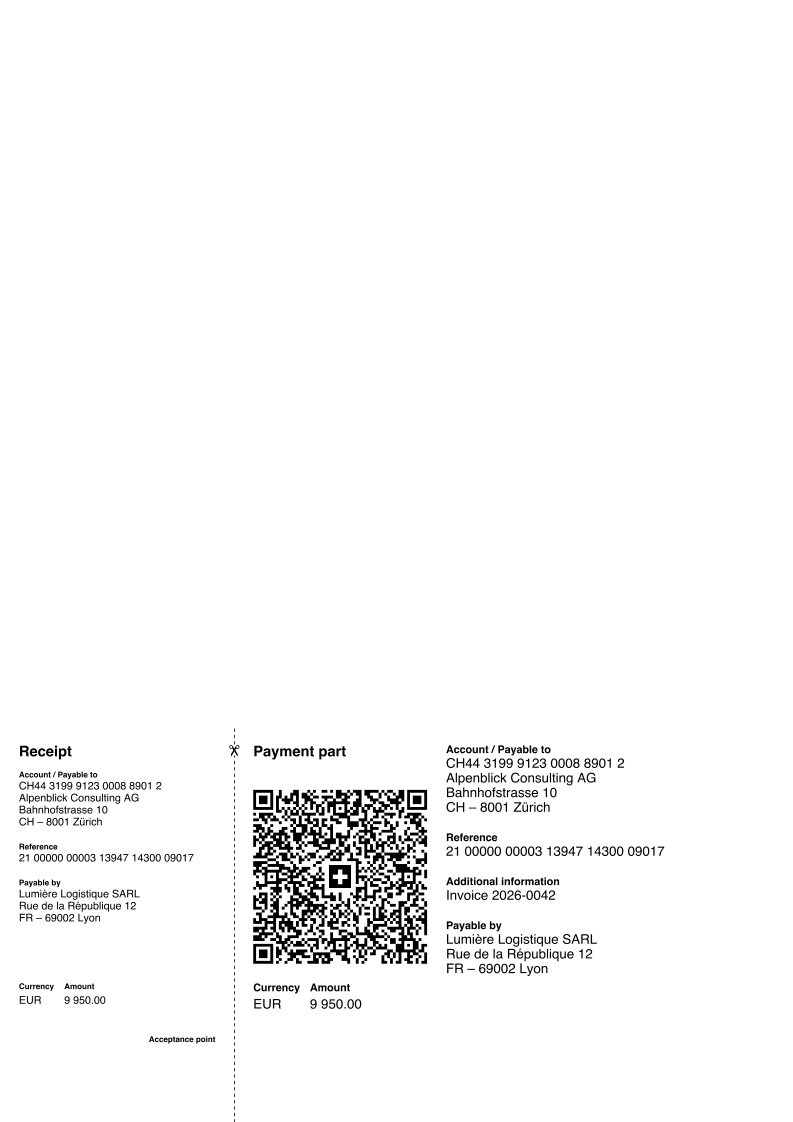
Cosa XGenerate non fa
La sezione pagamento viene composta sul PDF dopo il rendering; l'output DOCX non la contiene e segnala un avviso QR_BILL, come un contenuto che non supera la validazione, invece di far fallire la richiesta. Viene disegnata solo la prima voce qrbills.
Lo provi sul Suo template
Ci invii un file Word che usa oggi. Lo renderizziamo con i Suoi dati e Le restituiamo il PDF insieme al template adattato, così la Sua valutazione non deve aspettare noi.
Richiedi una demo