

Guida · API REST
Generare un PDF da XML e da un template Word
I Suoi dati lasciano il sistema di origine come XML: un ordine, un'esportazione, un messaggio. Il layout è un template Word con campi unione standard. L'adattatore che mappa i Suoi elementi e attributi sui campi del template viene fornito come parte della Sua integrazione; la chiamata di generazione dietro di esso è la stessa che serve oggi i chiamanti JSON e restituisce il PDF o il DOCX finito.
Perché non costruire il PDF da XML da soli
- Una pipeline di fogli di stile da XML a oggetti di formattazione trasforma il layout in un artefatto per sviluppatori; chi è responsabile del documento non può modificarlo.
- Una libreria PDF alimentata da XML analizzato lega il layout a un runtime; ogni modifica al testo parte con un rilascio.
- Ogni formato di template con la propria sintassi significa formazione e template vincolati.
La richiesta
L'API di oggi accetta la busta fields, non XML. L'adattatore XML viene fornito come parte della Sua integrazione (tracciato come xgenerateio/xgenerate#364): mappa i Suoi elementi e attributi su campi scalari e gli elementi ripetuti su righe di lista, con i nomi dei codici MERGEFIELD del template. L'esempio mostra l'XML, la busta che ne deriva e la chiamata di generazione che esiste oggi.
TOKEN=$(curl -sS https://auth.xgenerate.io/realms/xgenerate/protocol/openid-connect/token \
  -d grant_type=client_credentials \
  -d client_id="$XGENERATE_CLIENT_ID" \
  -d client_secret="$XGENERATE_CLIENT_SECRET" | jq -r .access_token)

# 1. Your XML as it leaves the source system.
cat > invoice.xml <<'XML'
<invoice number="2026-0042" date="2026-10-25">
  <recipient>
    <name>Camille Durand</name>
  </recipient>
  <lines>
    <line description="Consulting, October" amount="CHF 4'800.00"/>
    <line description="Travel expenses" amount="CHF 312.40"/>
  </lines>
</invoice>
XML

# 2. The fields envelope the XML adapter produces (delivered as part of your
#    integration): elements and attributes become fields, repeating elements
#    become list rows. Names match the MERGEFIELD codes in the Word template.
cat > fields.json <<'JSON'
{
  "fields": [
    { "name": "invoice.number", "value": "2026-0042" },
    { "name": "invoice.date",   "value": "2026-10-25" },
    { "name": "recipient.name", "value": "Camille Durand" }
  ],
  "lists": [
    { "name": "invoice.lines", "value": [
      { "fields": [ { "name": "description", "value": "Consulting, October" },
                    { "name": "amount",      "value": "CHF 4'800.00" } ] },
      { "fields": [ { "name": "description", "value": "Travel expenses" },
                    { "name": "amount",      "value": "CHF 312.40" } ] }
    ] }
  ]
}
JSON

# 3. The generate call as it exists today: Word template + envelope, PDF back (format=DOCX for Word).
curl -sS https://api.xgenerate.io/v2/documents/generate \
  -H "Authorization: Bearer $TOKEN" \
  -F "file=@invoice.docx" \
  -F "fields=@fields.json;type=application/json" \
  -F "format=PDF" \
  -o invoice.pdf
Da .NET
using System.Net.Http.Json;
using System.Xml.Linq;

using var http = new HttpClient();
http.DefaultRequestHeaders.Authorization = new("Bearer", token);

// The mapping step your integration adds: elements and attributes become fields,
// repeating elements become list rows. Names match the template's MERGEFIELD codes.
var xml = XDocument.Load("invoice.xml").Root!;
var fields = new
{
    fields = new[]
    {
        new { name = "invoice.number", value = xml.Attribute("number")!.Value },
        new { name = "invoice.date",   value = xml.Attribute("date")!.Value },
        new { name = "recipient.name", value = xml.Element("recipient")!.Element("name")!.Value }
    },
    lists = new[]
    {
        new
        {
            name = "invoice.lines",
            value = xml.Element("lines")!.Elements("line").Select(line => new
            {
                fields = new[]
                {
                    new { name = "description", value = line.Attribute("description")!.Value },
                    new { name = "amount",      value = line.Attribute("amount")!.Value }
                }
            }).ToArray()
        }
    }
};

// The generate call as it exists today: Word template + envelope over the JSON transport.
var request = new
{
    filename = "invoice.docx",
    content = Convert.ToBase64String(await File.ReadAllBytesAsync("invoice.docx")),
    format = "PDF",
    fields
};
var response = await http.PostAsJsonAsync(
    "https://api.xgenerate.io/v2/documents/generate", request);
response.EnsureSuccessStatusCode();

var result = await response.Content.ReadFromJsonAsync<GenerateResult>();
await File.WriteAllBytesAsync(result!.Filename, Convert.FromBase64String(result.Content));

record GenerateResult(string Filename, string Content, string Format);
La risposta
La chiamata multipart restituisce il PDF come byte grezzi; il trasporto JSON restituisce filename, content, format e warnings. Gli avvisi indicano i segnaposto per immagine, QR e carta intestata rimasti senza valore; i campi unione e le regioni senza dati vengono rimossi senza avviso. La richiesta riesce in ogni caso.
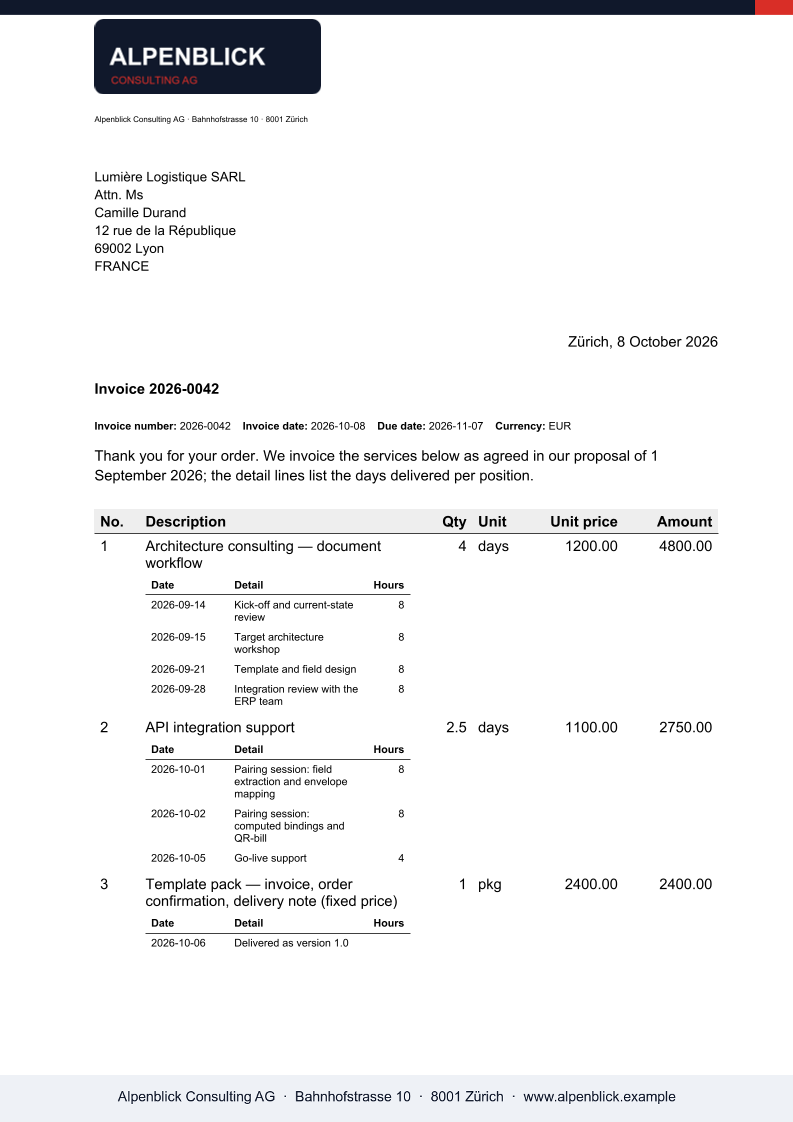
Il risultato
Cosa XGenerate non fa
L'XML oggi non è un input dell'API: gli endpoint di generazione accettano la busta fields in JSON, oppure un corpo HTML o Markdown, e l'adattatore XML viene costruito come parte della Sua integrazione sul Suo XML di esempio (xgenerateio/xgenerate#364). I fogli di stile XSLT non vengono eseguiti. I blocchi condizionali dipendenti da un valore non sono supportati; i campi IF di Word attorno a un testo sì.
Lo provi sul Suo template
Ci invii un file Word che usa oggi. Lo renderizziamo con i Suoi dati e Le restituiamo il PDF insieme al template adattato, così la Sua valutazione non deve aspettare noi.
Richiedi una demo