

Guide · REST API
Generate Swiss QR-bill invoices from a Word template
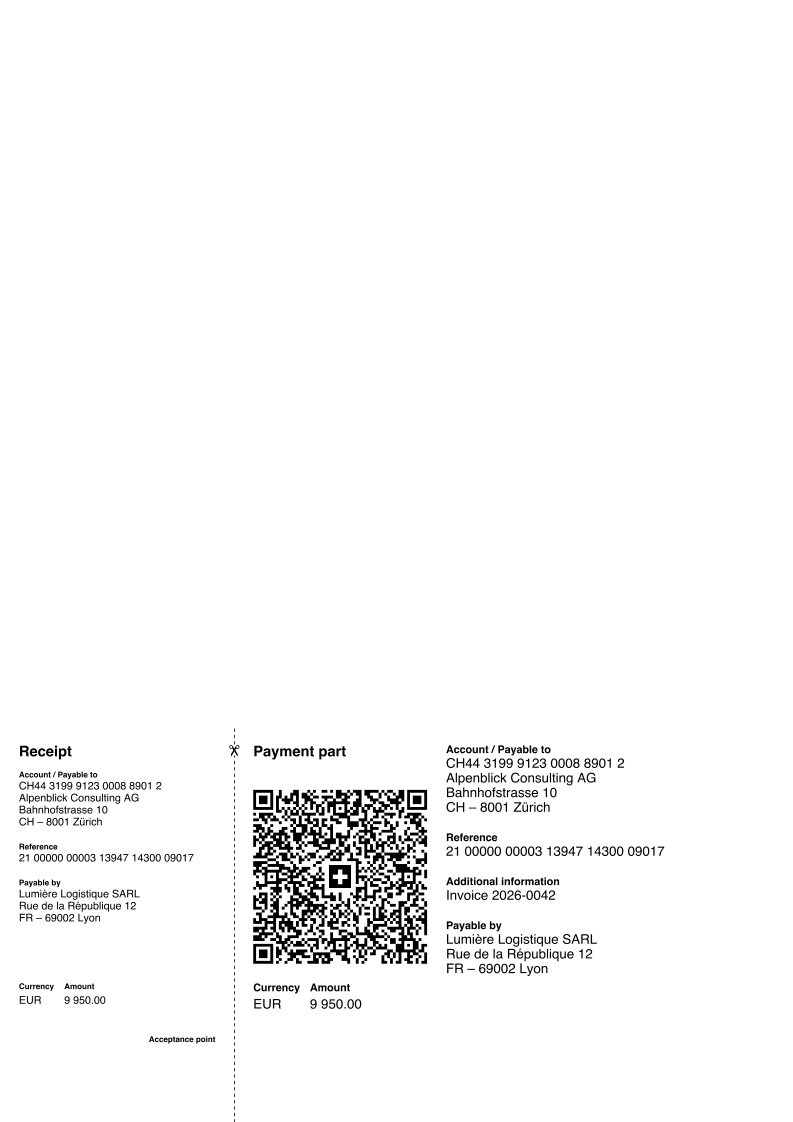
Your invoice stays a Word template. The payment part comes from the data: a qrbills entry with creditor, debtor, amount, currency and reference, and the API draws the QR-bill onto the rendered PDF, on the last page or on a page of its own. QR-IBAN with a QR reference, or IBAN with a creditor reference or none.
Why not draw the payment part yourself
- The QR-bill has fixed dimensions, fonts, texts in four languages and a Swiss QR Code with an exact payload; a hand-built version is rejected by banks.
- Invoice layout and payment part from two tools: a change in one breaks the other.
- A PDF library does not know the SIX specification; a Word template does not know how to draw the slip.
The request
The qrbills entry carries the payload as a JSON string inside the envelope. The template needs no placeholder for the slip; placement NEW_PAGE_AT_END appends a page, LAST_PAGE draws it at the bottom of the last page.
TOKEN=$(curl -sS https://auth.xgenerate.io/realms/xgenerate/protocol/openid-connect/token \
  -d grant_type=client_credentials \
  -d client_id="$XGENERATE_CLIENT_ID" \
  -d client_secret="$XGENERATE_CLIENT_SECRET" | jq -r .access_token)

# The payload is a JSON string inside the envelope; the template needs no placeholder for the slip.
cat > fields.json <<'JSON'
{
  "fields": [
    { "name": "invoice.number", "value": "2026-0042" },
    { "name": "invoice.total",  "value": "CHF 1'234.50" }
  ],
  "qrbills": [
    { "name": "payment",
      "value": "{\"qrIban\": \"CH4431999123000889012\", \"amount\": \"1234.50\", \"currency\": \"CHF\", \"reference\": {\"type\": \"QRR\", \"value\": \"210000000003139471430009017\"}, \"creditor\": {\"name\": \"Alpenblick Consulting AG\", \"street\": \"Bahnhofstrasse\", \"houseNo\": \"10\", \"postalCode\": \"8001\", \"town\": \"Zürich\", \"country\": \"CH\"}, \"debtor\": {\"name\": \"Lumière Logistique SARL\", \"street\": \"Rue de la République\", \"houseNo\": \"12\", \"postalCode\": \"69002\", \"town\": \"Lyon\", \"country\": \"FR\"}, \"language\": \"DE\", \"placement\": \"NEW_PAGE_AT_END\"}" }
  ]
}
JSON

curl -sS https://api.xgenerate.io/v2/documents/generate \
  -H "Authorization: Bearer $TOKEN" \
  -F "file=@invoice.docx" \
  -F "fields=@fields.json;type=application/json" \
  -F "format=PDF" \
  -o invoice.pdf
From .NET
using System.Net.Http.Json;
using System.Text.Json;

using var http = new HttpClient();
http.DefaultRequestHeaders.Authorization = new("Bearer", token);

// The QR-bill payload travels as a JSON string inside the envelope.
var payment = JsonSerializer.Serialize(new
{
    qrIban = "CH4431999123000889012",
    amount = "1234.50",
    currency = "CHF",
    reference = new { type = "QRR", value = "210000000003139471430009017" },
    creditor = new { name = "Alpenblick Consulting AG", street = "Bahnhofstrasse", houseNo = "10",
                     postalCode = "8001", town = "Zürich", country = "CH" },
    debtor = new { name = "Lumière Logistique SARL", street = "Rue de la République", houseNo = "12",
                   postalCode = "69002", town = "Lyon", country = "FR" },
    language = "DE",
    placement = "NEW_PAGE_AT_END"
});

var request = new
{
    filename = "invoice.docx",
    content = Convert.ToBase64String(await File.ReadAllBytesAsync("invoice.docx")),
    format = "PDF",
    fields = new
    {
        fields = new[] { new { name = "invoice.number", value = "2026-0042" } },
        qrbills = new[] { new { name = "payment", value = payment } }
    }
};
var response = await http.PostAsJsonAsync(
    "https://api.xgenerate.io/v2/documents/generate", request);
response.EnsureSuccessStatusCode();

var result = await response.Content.ReadFromJsonAsync<GenerateResult>();
await File.WriteAllBytesAsync(result!.Filename, Convert.FromBase64String(result.Content));

record GenerateResult(string Filename, string Content, string Format);
The response
The PDF streams back with the payment part composited after rendering. The JSON transport returns filename, content, format and warnings. A payload that fails validation, or a DOCX format, returns the document without the slip and a QR_BILL warning that says why; the request itself succeeds.
The output
What XGenerate does not do
The payment part is composited onto the PDF after rendering, so DOCX output carries no slip and reports a QR_BILL warning; a payload that fails validation does the same rather than failing the request. Only the first qrbills entry is rendered.
Try it on your own template
Send us a Word file you use today. We render it with your data and return the PDF together with the adapted template, so your evaluation does not have to wait on us.
Request a demo