

Guide · REST API
Generate a PDF from XML and a Word template
Your data leaves the source system as XML: an order, an export, a message. The layout is a Word template with standard merge fields. The adapter that maps your elements and attributes onto the template's fields is delivered as part of your integration; the generate call behind it is the one that serves JSON callers today and returns the finished PDF or DOCX.
Why not build the PDF from XML yourself
- A stylesheet pipeline from XML to formatting objects makes the layout a developer artifact; the people who own the document cannot change it.
- A PDF library fed from parsed XML binds the layout to one runtime; every wording change ships with a release.
- Every template format with its own syntax means retraining and locked-in templates.
The request
Today's API takes the fields envelope, not XML. The XML adapter is delivered as part of your integration (tracked as xgenerateio/xgenerate#364): it maps your elements and attributes onto scalar fields and repeating elements onto list rows, named after the MERGEFIELD codes in the template. The sample shows the XML, the envelope it becomes, and the generate call that exists today.
TOKEN=$(curl -sS https://auth.xgenerate.io/realms/xgenerate/protocol/openid-connect/token \
  -d grant_type=client_credentials \
  -d client_id="$XGENERATE_CLIENT_ID" \
  -d client_secret="$XGENERATE_CLIENT_SECRET" | jq -r .access_token)

# 1. Your XML as it leaves the source system.
cat > invoice.xml <<'XML'
<invoice number="2026-0042" date="2026-10-25">
  <recipient>
    <name>Camille Durand</name>
  </recipient>
  <lines>
    <line description="Consulting, October" amount="CHF 4'800.00"/>
    <line description="Travel expenses" amount="CHF 312.40"/>
  </lines>
</invoice>
XML

# 2. The fields envelope the XML adapter produces (delivered as part of your
#    integration): elements and attributes become fields, repeating elements
#    become list rows. Names match the MERGEFIELD codes in the Word template.
cat > fields.json <<'JSON'
{
  "fields": [
    { "name": "invoice.number", "value": "2026-0042" },
    { "name": "invoice.date",   "value": "2026-10-25" },
    { "name": "recipient.name", "value": "Camille Durand" }
  ],
  "lists": [
    { "name": "invoice.lines", "value": [
      { "fields": [ { "name": "description", "value": "Consulting, October" },
                    { "name": "amount",      "value": "CHF 4'800.00" } ] },
      { "fields": [ { "name": "description", "value": "Travel expenses" },
                    { "name": "amount",      "value": "CHF 312.40" } ] }
    ] }
  ]
}
JSON

# 3. The generate call as it exists today: Word template + envelope, PDF back (format=DOCX for Word).
curl -sS https://api.xgenerate.io/v2/documents/generate \
  -H "Authorization: Bearer $TOKEN" \
  -F "file=@invoice.docx" \
  -F "fields=@fields.json;type=application/json" \
  -F "format=PDF" \
  -o invoice.pdf
From .NET
using System.Net.Http.Json;
using System.Xml.Linq;

using var http = new HttpClient();
http.DefaultRequestHeaders.Authorization = new("Bearer", token);

// The mapping step your integration adds: elements and attributes become fields,
// repeating elements become list rows. Names match the template's MERGEFIELD codes.
var xml = XDocument.Load("invoice.xml").Root!;
var fields = new
{
    fields = new[]
    {
        new { name = "invoice.number", value = xml.Attribute("number")!.Value },
        new { name = "invoice.date",   value = xml.Attribute("date")!.Value },
        new { name = "recipient.name", value = xml.Element("recipient")!.Element("name")!.Value }
    },
    lists = new[]
    {
        new
        {
            name = "invoice.lines",
            value = xml.Element("lines")!.Elements("line").Select(line => new
            {
                fields = new[]
                {
                    new { name = "description", value = line.Attribute("description")!.Value },
                    new { name = "amount",      value = line.Attribute("amount")!.Value }
                }
            }).ToArray()
        }
    }
};

// The generate call as it exists today: Word template + envelope over the JSON transport.
var request = new
{
    filename = "invoice.docx",
    content = Convert.ToBase64String(await File.ReadAllBytesAsync("invoice.docx")),
    format = "PDF",
    fields
};
var response = await http.PostAsJsonAsync(
    "https://api.xgenerate.io/v2/documents/generate", request);
response.EnsureSuccessStatusCode();

var result = await response.Content.ReadFromJsonAsync<GenerateResult>();
await File.WriteAllBytesAsync(result!.Filename, Convert.FromBase64String(result.Content));

record GenerateResult(string Filename, string Content, string Format);
The response
The multipart call streams the PDF back as raw bytes; the JSON transport returns filename, content, format and warnings. Warnings name image, QR and letterhead slots that received no value; merge fields and regions without data are removed without a warning. The request succeeds either way.
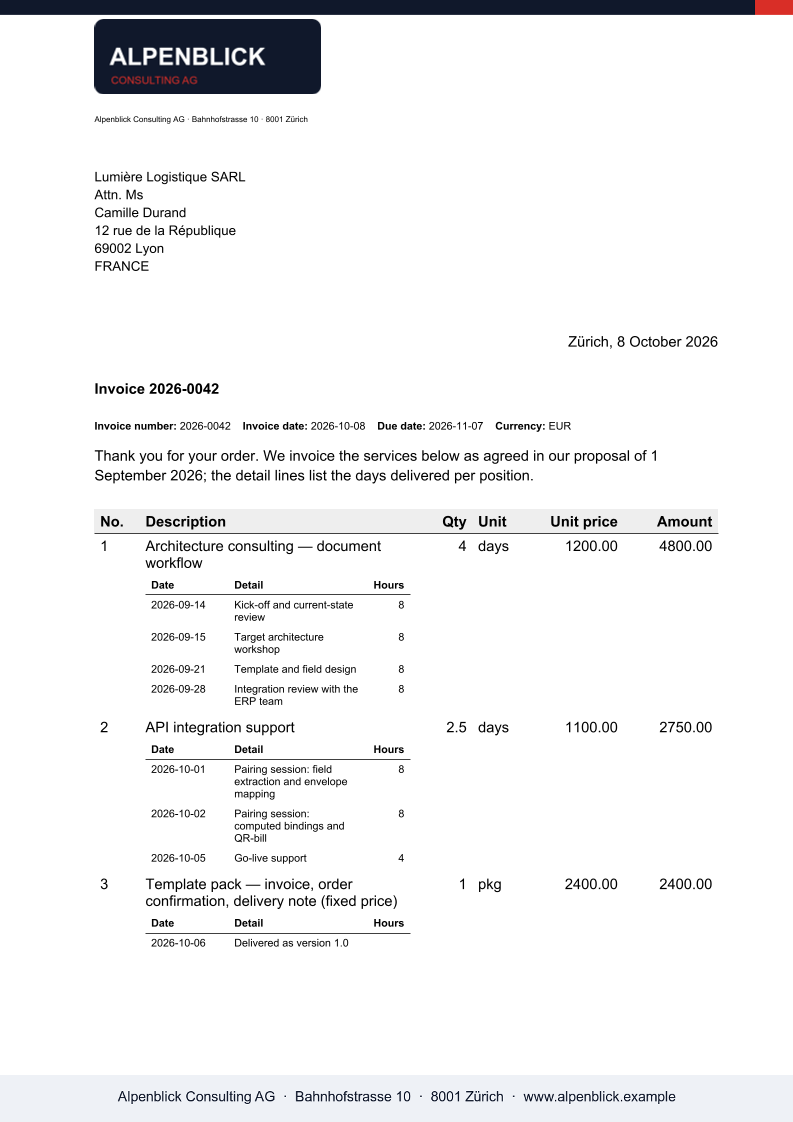
The output
What XGenerate does not do
XML is not an input of the API today: the generate endpoints take the fields envelope as JSON, or an HTML or Markdown body, and the XML adapter is built as part of your integration against your sample XML (xgenerateio/xgenerate#364). XSLT stylesheets are not executed. Conditional blocks that depend on a data value are not supported; Word IF fields around text are.
Try it on your own template
Send us a Word file you use today. We render it with your data and return the PDF together with the adapted template, so your evaluation does not have to wait on us.
Request a demo