

Guide · REST API
A DOCX template engine you call, not install
Standard Word merge fields, TableStart and TableEnd regions, image slots: the template stays a plain .docx anyone can edit. Your code sends the file and the data, the engine returns the finished document. Nothing to install, no Word on the server, no syntax to learn.
What an in-process library costs you
- A DOCX library binds you to one language and one runtime; the next service in another stack starts over.
- Rendering through Word on a server adds an Office installation and its updates to your deployment.
- Engines with their own placeholder syntax turn every template into developer work.
The request
The curl call shows the multipart transport; the .NET, Java and Python samples below use the JSON transport (template base64-encoded in content) or multipart, as each stack finds convenient. The fields envelope is the same everywhere.
TOKEN=$(curl -sS https://auth.xgenerate.io/realms/xgenerate/protocol/openid-connect/token \
  -d grant_type=client_credentials \
  -d client_id="$XGENERATE_CLIENT_ID" \
  -d client_secret="$XGENERATE_CLIENT_SECRET" | jq -r .access_token)

# The template is a plain .docx with MERGEFIELD placeholders and a TableStart:items region.
curl -sS https://api.xgenerate.io/v2/documents/generate \
  -H "Authorization: Bearer $TOKEN" \
  -F "file=@contract.docx" \
  -F "fields=@fields.json;type=application/json" \
  -F "format=PDF" \
  -o contract.pdf
From .NET
using System.Net.Http.Json;

using var http = new HttpClient();
http.DefaultRequestHeaders.Authorization = new("Bearer", token);

var request = new
{
    filename = "contract.docx",
    content = Convert.ToBase64String(await File.ReadAllBytesAsync("contract.docx")),
    format = "PDF",
    fields = new
    {
        fields = new[] { new { name = "customer.name", value = "Alpenblick Consulting AG" } }
    }
};
var response = await http.PostAsJsonAsync(
    "https://api.xgenerate.io/v2/documents/generate", request);
response.EnsureSuccessStatusCode();

var result = await response.Content.ReadFromJsonAsync<GenerateResult>();
await File.WriteAllBytesAsync(result!.Filename, Convert.FromBase64String(result.Content));

record GenerateResult(string Filename, string Content, string Format);
From Java
import java.net.URI;
import java.net.http.HttpClient;
import java.net.http.HttpRequest;
import java.net.http.HttpResponse;
import java.nio.file.Files;
import java.nio.file.Path;
import java.util.Base64;

var template = Base64.getEncoder().encodeToString(Files.readAllBytes(Path.of("contract.docx")));
var body = """
    {"filename": "contract.docx", "content": "%s", "format": "PDF",
     "fields": {"fields": [{"name": "customer.name", "value": "Alpenblick Consulting AG"}]}}
    """.formatted(template);

var request = HttpRequest.newBuilder(URI.create("https://api.xgenerate.io/v2/documents/generate"))
    .header("Authorization", "Bearer " + token)
    .header("Content-Type", "application/json")
    .POST(HttpRequest.BodyPublishers.ofString(body))
    .build();
var response = HttpClient.newHttpClient().send(request, HttpResponse.BodyHandlers.ofString());

// response.body() holds filename, content (base64), format and warnings:
// parse it with your JSON library and Base64-decode content into contract.pdf.
From Python
import requests

token = "..."  # client-credentials token from auth.xgenerate.io

with open("contract.docx", "rb") as template, open("fields.json", "rb") as fields:
    response = requests.post(
        "https://api.xgenerate.io/v2/documents/generate",
        headers={"Authorization": f"Bearer {token}"},
        files={
            "file": ("contract.docx", template),
            "fields": ("fields.json", fields, "application/json"),
        },
        data={"format": "PDF"},
        timeout=60,
    )
response.raise_for_status()

with open("contract.pdf", "wb") as out:
    out.write(response.content)
The response
Raw bytes on the multipart transport, a JSON object with filename, content, format and warnings on the JSON transport. Warnings name image, QR and letterhead slots that received no value, plus rendering notes such as font substitution; merge fields and regions without data are removed without a warning. The request succeeds either way.
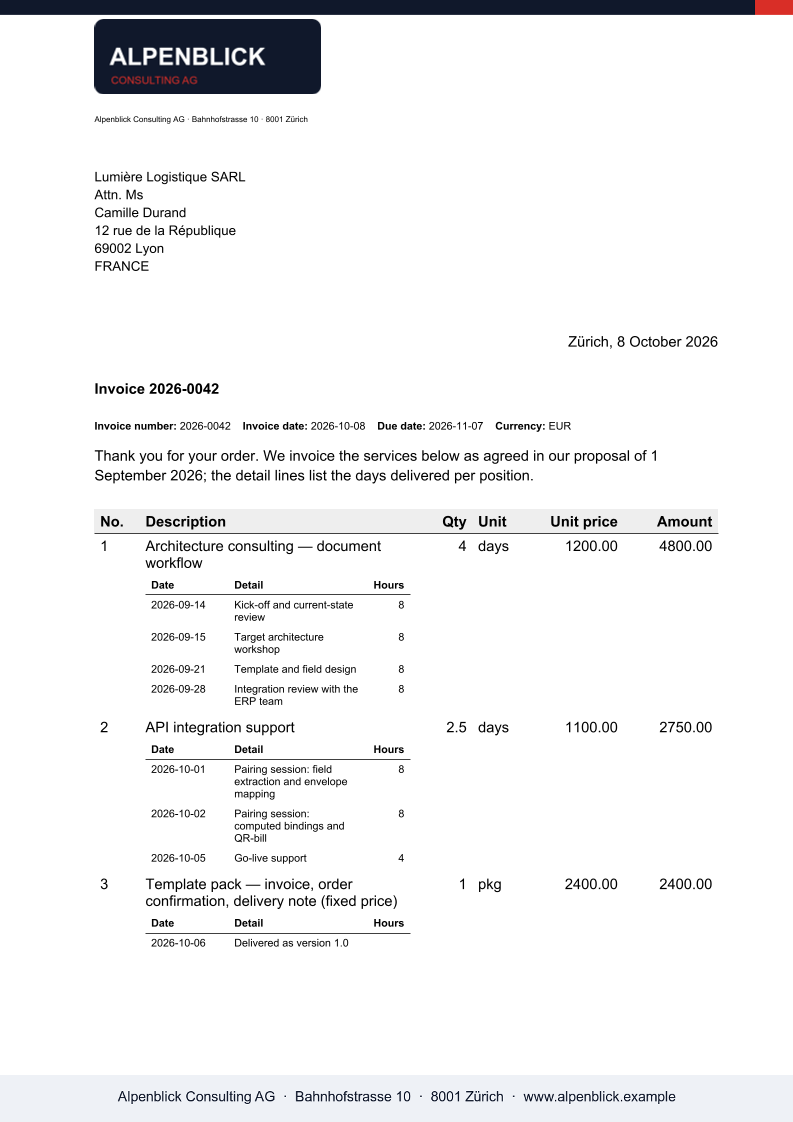
The output
What XGenerate does not do
Templates use standard Word merge fields, TableStart / TableEnd regions and alt-text image slots. Computed expressions are evaluated through an optional bindings sidecar or the /bindings/evaluate API, outside the Word template. Conditional blocks by data value are not supported; Word IF fields around text are.
Try it on your own template
Send us a Word file you use today. We render it with your data and return the PDF together with the adapted template, so your evaluation does not have to wait on us.
Request a demo