

Guide · REST API
Convert DOCX to PDF with one API call
Send a Word file, get a PDF back. XGenerate renders the document the way Word lays it out: fonts, tables, headers, page breaks. The same call fills merge fields from JSON when you have data to add.
When a converter is not enough
- HTML-to-PDF tools re-flow your Word layout; a contract or an invoice has to look like the original.
- Running Word on a server to print PDFs is fragile, slow and not licensed for automation.
- A conversion-only API leaves the data step to you; the document usually needs values filled in first.
The request
Multipart transport: the Word file is the file part, the format a plain form value. Without a fields part the document is rendered as it is, with any merge-field placeholders removed.
TOKEN=$(curl -sS https://auth.xgenerate.io/realms/xgenerate/protocol/openid-connect/token \
  -d grant_type=client_credentials \
  -d client_id="$XGENERATE_CLIENT_ID" \
  -d client_secret="$XGENERATE_CLIENT_SECRET" | jq -r .access_token)

# No fields part: the Word file is rendered as it is, placeholders removed.
curl -sS https://api.xgenerate.io/v2/documents/generate \
  -H "Authorization: Bearer $TOKEN" \
  -F "file=@contract.docx" \
  -F "format=PDF" \
  -o contract.pdf
From .NET
using System.Net.Http.Json;

using var http = new HttpClient();
http.DefaultRequestHeaders.Authorization = new("Bearer", token);

// JSON transport: the template travels base64-encoded, the PDF comes back the same way.
var request = new
{
    filename = "contract.docx",
    content = Convert.ToBase64String(await File.ReadAllBytesAsync("contract.docx")),
    format = "PDF"
};
var response = await http.PostAsJsonAsync(
    "https://api.xgenerate.io/v2/documents/generate", request);
response.EnsureSuccessStatusCode();

var result = await response.Content.ReadFromJsonAsync<GenerateResult>();
await File.WriteAllBytesAsync(result!.Filename, Convert.FromBase64String(result.Content));

record GenerateResult(string Filename, string Content, string Format);
The response
The multipart call streams the PDF back as raw bytes with Content-Type application/pdf and the filename extension rewritten to .pdf. The JSON transport returns filename, content, format and warnings, with the PDF base64-encoded in content.
The output
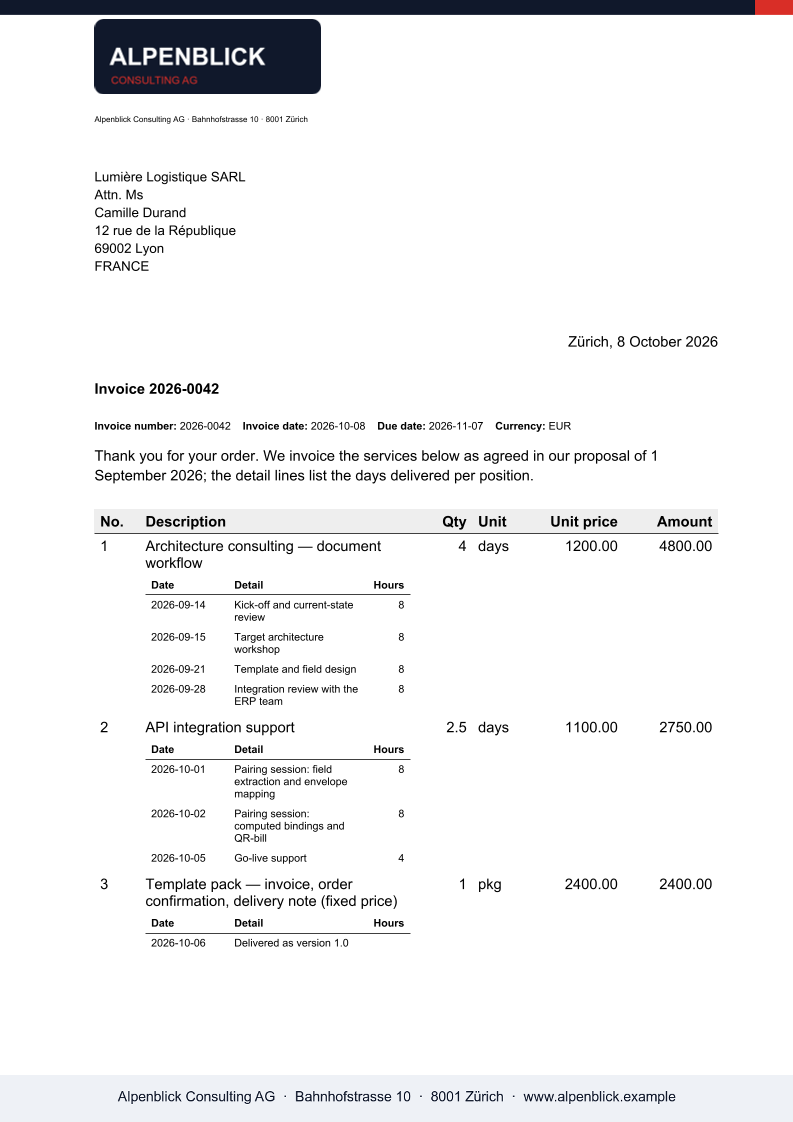
What XGenerate does not do
XGenerate renders Word files the way Word lays them out. It does not OCR scanned pages or convert a PDF back into Word. It can stamp text and images onto an existing PDF, but is not a general-purpose PDF editor.
Try it on your own template
Send us a Word file you use today. We render it with your data and return the PDF together with the adapted template, so your evaluation does not have to wait on us.
Request a demo