

Guide · REST API
Fill a Word template from code, without Word
Two calls. The first reads the template and returns every placeholder it declares: merge fields, repeating regions, image and QR slots. The second sends the values and returns the finished PDF or DOCX. No Word on the server, no Office interop, no add-in.
What goes wrong without an API
- Office interop on a server is slow, single-threaded and unsupported for unattended use.
- Hand-editing document.xml breaks the moment someone restyles the template in Word.
- Placeholder lists drift: the code expects fields the template no longer has, or misses new ones.
The request
The extraction call takes the template alone and answers with the seed envelope: one entry per placeholder, values null. Fill that envelope and send it back with the template to the generate endpoint.
TOKEN=$(curl -sS https://auth.xgenerate.io/realms/xgenerate/protocol/openid-connect/token \
  -d grant_type=client_credentials \
  -d client_id="$XGENERATE_CLIENT_ID" \
  -d client_secret="$XGENERATE_CLIENT_SECRET" | jq -r .access_token)

# 1. Discover the placeholders: the seed envelope lists every field, region, image and QR-bill slot.
curl -sS https://api.xgenerate.io/v2/documents/fields \
  -H "Authorization: Bearer $TOKEN" \
  -F "file=@letter.docx" \
  | jq '{fields: [.fields[].name], lists: [.lists[].name], images: [.images[].name]}'

# 2. Fill it: send the same template with the values.
cat > fields.json <<'JSON'
{ "fields": [
    { "name": "recipient.name", "value": "Camille Durand" },
    { "name": "letter.date",    "value": "25.10.2026" },
    { "name": "letter.subject", "value": "Your contract renewal" } ] }
JSON

curl -sS https://api.xgenerate.io/v2/documents/generate \
  -H "Authorization: Bearer $TOKEN" \
  -F "file=@letter.docx" \
  -F "fields=@fields.json;type=application/json" \
  -F "format=PDF" \
  -o letter.pdf
From .NET
using System.Net.Http.Json;

using var http = new HttpClient();
http.DefaultRequestHeaders.Authorization = new("Bearer", token);

var template = Convert.ToBase64String(await File.ReadAllBytesAsync("letter.docx"));

// 1. Discover the placeholders the template declares.
var extracted = await http.PostAsJsonAsync(
    "https://api.xgenerate.io/v2/documents/fields", new { content = template });
extracted.EnsureSuccessStatusCode();
var seed = await extracted.Content.ReadFromJsonAsync<Envelope>();
// seed!.Fields holds one entry per merge field, each with Value null.

// 2. Fill them and render.
var request = new
{
    filename = "letter.docx",
    content = template,
    format = "PDF",
    fields = new
    {
        fields = new[]
        {
            new { name = "recipient.name", value = "Camille Durand" },
            new { name = "letter.subject", value = "Your contract renewal" }
        }
    }
};
var response = await http.PostAsJsonAsync(
    "https://api.xgenerate.io/v2/documents/generate", request);
response.EnsureSuccessStatusCode();

var result = await response.Content.ReadFromJsonAsync<GenerateResult>();
await File.WriteAllBytesAsync(result!.Filename, Convert.FromBase64String(result.Content));

record Field(string Name, string? Value);
record Envelope(Field[] Fields);
record GenerateResult(string Filename, string Content, string Format);
The response
The extraction call returns the DocumentFields envelope as JSON. The generate call streams the PDF back on the multipart transport, or returns filename, content, format and warnings on the JSON transport; warnings name image, QR and letterhead slots without a value, and merge fields without data are removed without a warning.
The output
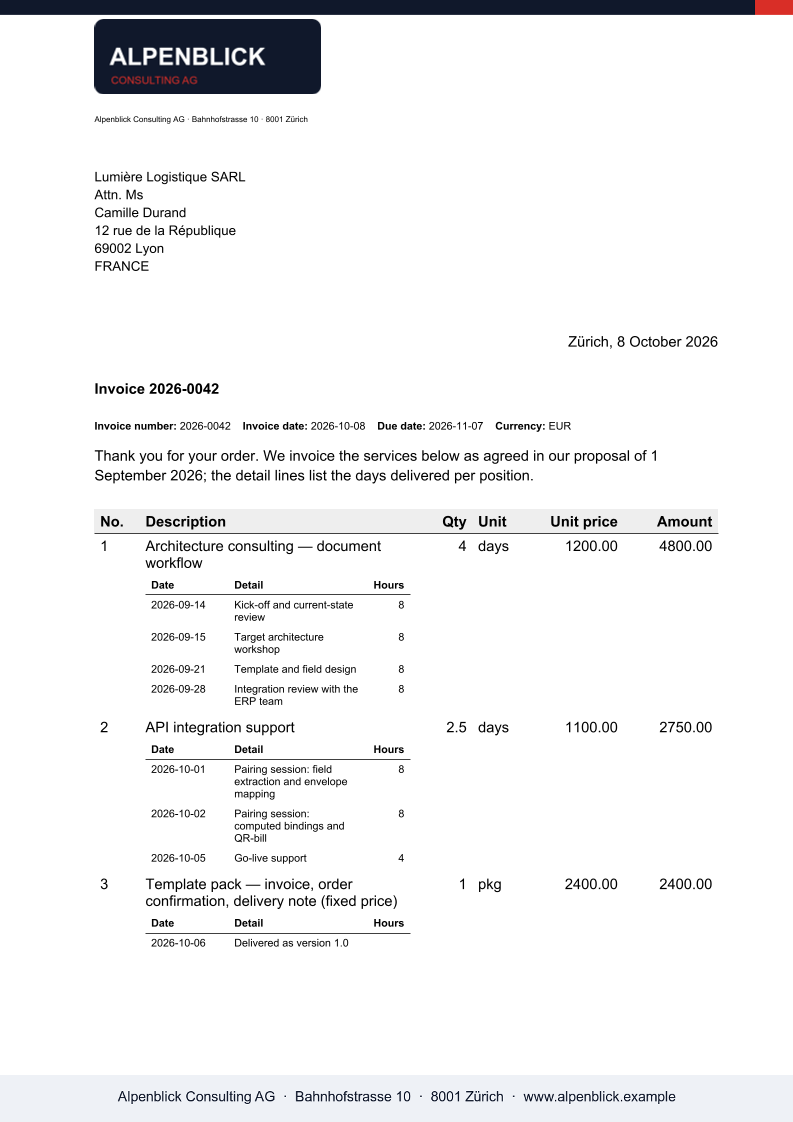
What XGenerate does not do
Templates use standard Word merge fields, TableStart / TableEnd regions and alt-text image slots. Computed expressions are evaluated through an optional bindings sidecar or the /bindings/evaluate API, outside the Word template. Conditional blocks by data value are not supported; Word IF fields around text are.
Try it on your own template
Send us a Word file you use today. We render it with your data and return the PDF together with the adapted template, so your evaluation does not have to wait on us.
Request a demo